BMW MG1 ECU Tuning: OBD and Bench Modes with HexProg II Tuner
The Bosch MG1 is a modern petrol engine control unit (ECU/DME) family used in BMW and MINI vehicles since approximately 2016, replacing older MED17 units. It is now a key platform for professional ECU tuning, covering a wide range of vehicles and engine configurations.
However, Bosch and BMW introduced stronger security protections in different stages, making the correct tuning procedure dependent on the ECU variant, microcontroller, and production date.
HexProg II Tuner supports both OBD and Bench modes, helping tuners identify the ECU, select the appropriate workflow, and perform supported operations without unnecessary guesswork.
This guide explains BMW MG1 identification, OBD and Bench compatibility, ECU patching, recovery from Programming Mode, coding protection, fault-code management, and ISN reading.
What Is the Bosch BMW MG1 ECU?
The Bosch MG1 manages the engine's torque-based control strategy, translating driver inputs and selected driving modes into commands for the engine's control systems.
Its functions include:
- Fuel injection and engine torque management.
- Turbocharger boost control.
- Exhaust gas temperature monitoring.
- Variable valve timing and throttle control.
- Factory security and anti-tampering functions.
For professional ECU tuning, accurate identification, reliable file handling, and preservation of essential vehicle data are critical. An interrupted or incorrect programming operation can leave the ECU in Programming Mode and require a recovery procedure.
HexProg II Tuner provides dedicated workflows for supported BMW MG1 variants, covering ECU identification, backup, patching, flash programming, coding management, and ISN reading.
BMW MG1 Variants, Engines, and Compatibility
The MG1 is a family, not a part number. The common BMW variants are MG1CS003, MG1CS024, MG1CS049 and MG1CS201, paired with the B48, B58, S58 and S68 petrol engines. Fitment is not limited to the G series a number of F series cars, F20 and F56 among them, carry MG1 hardware too. Under the shell the family spans SPC5777 (PowerPC) and TC298 / TC299 (TriCore). Two cars can look identical on the bench and still demand different handling because of MCU and build date which is precisely why the identification rule is the first step, not an afterthought.
Understanding the June 2020 BMW MG1 Security Lock
From approximately June 2020, stronger Bosch and BMW security protections affected many MG1 implementations. These protections restricted traditional OBD and straightforward Bench flashing procedures on certain ECU variants.
For practical tuning purposes, the supported workflow is determined by the microcontroller and, for relevant TC29X units, the ECU generation.
OBD and Bench: What Each Generation Allows
Stated plainly, this is the support logic a professional chip tuning platform has to honor:
- SPC5777 ECUs → OBD works without issue, pre and post lock alike.
- TC29X, pre June 2020 → OBD works. Identify, click Write, pick the flash file, done.
- TC29X, post June 2020 → locked in both modes. Bench works for every such ECU, no case opening. For OBD the tuner has two valid choices: stay on Bench for the whole job, or patch once on Bench and then use OBD normally. There is no way to apply the patch over OBD on these units attempting it produces the 9D6 error.
So, the only reason to patch a post lock TC29X is to enable OBD. Bench never needs a patch. If you are unsure of anything, Bench is the safe default it does the job on every MG1 regardless of generation or MCU.
When the ECU generation or security status is uncertain, use Bench Mode as the default workflow.
Patching: Why 9D6 Happens and How to Get Out of It
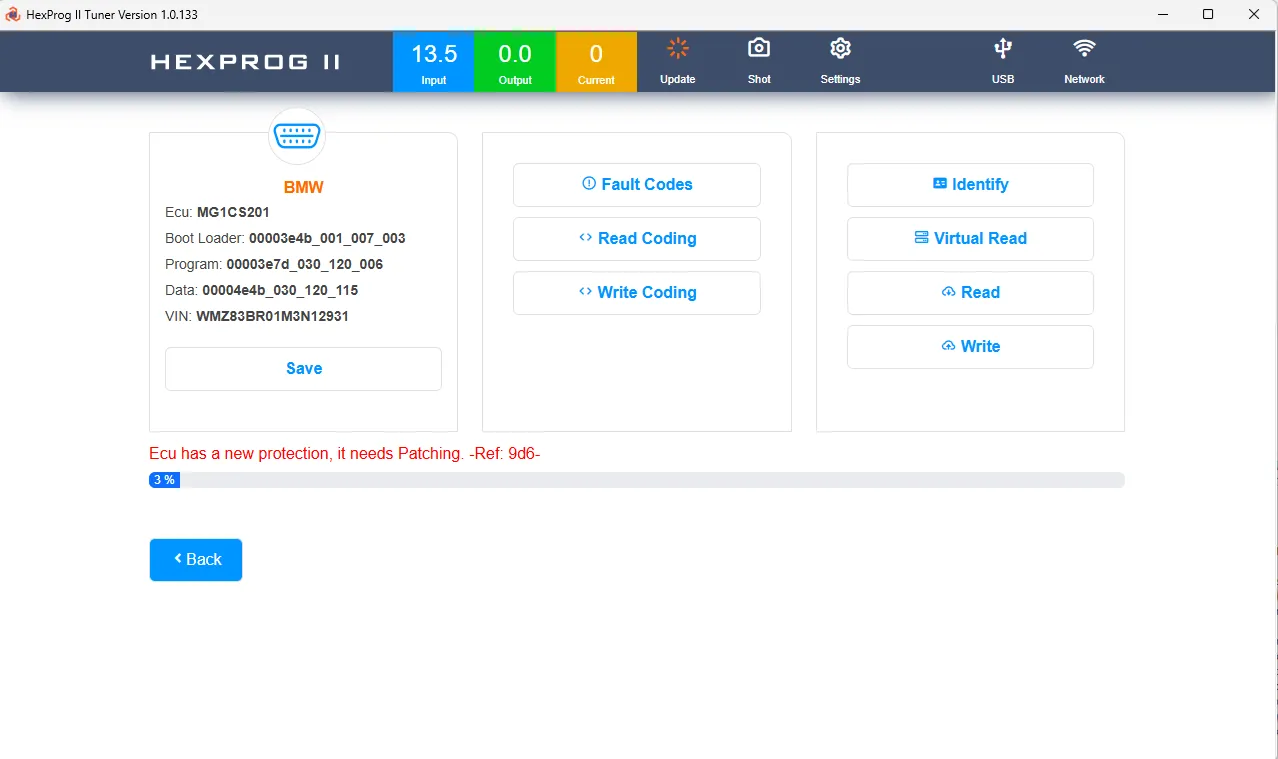
Patching enables OBD access on supported post-June 2020 TC29X ECUs. The patch must be applied through Bench Mode.
The flash-type selection shown on the Bench screen, such as Internal Flash or Internal EEPROM, does not determine the patching procedure.
Why Does Error 9D6 Occur?
Error 9D6 can appear when an OBD write is attempted on an ECU that requires Bench patching, for example, when the tuner/user incorrectly identified the Ecu as a pre-lock unit or its previous patch status has been misunderstood.
HexProg II stops the operation instead of proceeding with an unsupported write.
How to recover and this is the part that saves the ECU:
- If the write attempt left the ECU in programming mode, flash the original flash first to return it to application mode. You cannot patch or flash normally while it is in programming mode.
- Switch to Bench mode and patch the ECU. Bench patching takes less than a minute and is totally safe.
- Return to OBD and continue it will now work normally.
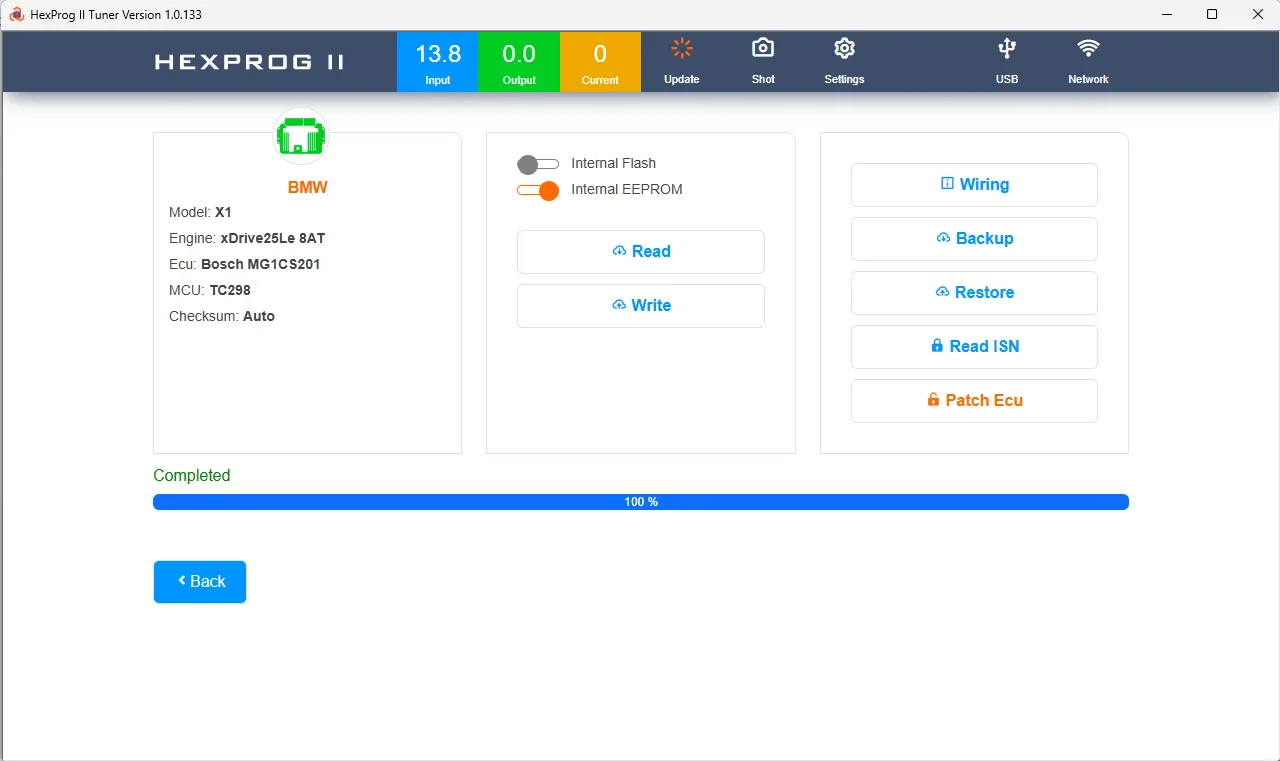
Always create a backup before patching. Hexprog II strongly recommends a Backup of the ECU ahead of any patch; the patch reports a clear "Completed" when done.
What wipes the patch: writing the original flash back (OBD or Bench), or updating the ECU with another programmer such as the original BMW tool or Autohex II. This is by design Hexprog II understands what the user wants: if you restore the original, the tool reads that as "give me a clean copy of the flash" and honours it. The consequence is the same recovery loop: on a post 2020 unit, after restoring the original, you must re patch on Bench before writing a modified file over OBD again.
Real-Time Fault Codes over OBD
HexProg II Tuner includes integrated fault-code functionality for supported BMW MG1 ECUs through OBD Mode.
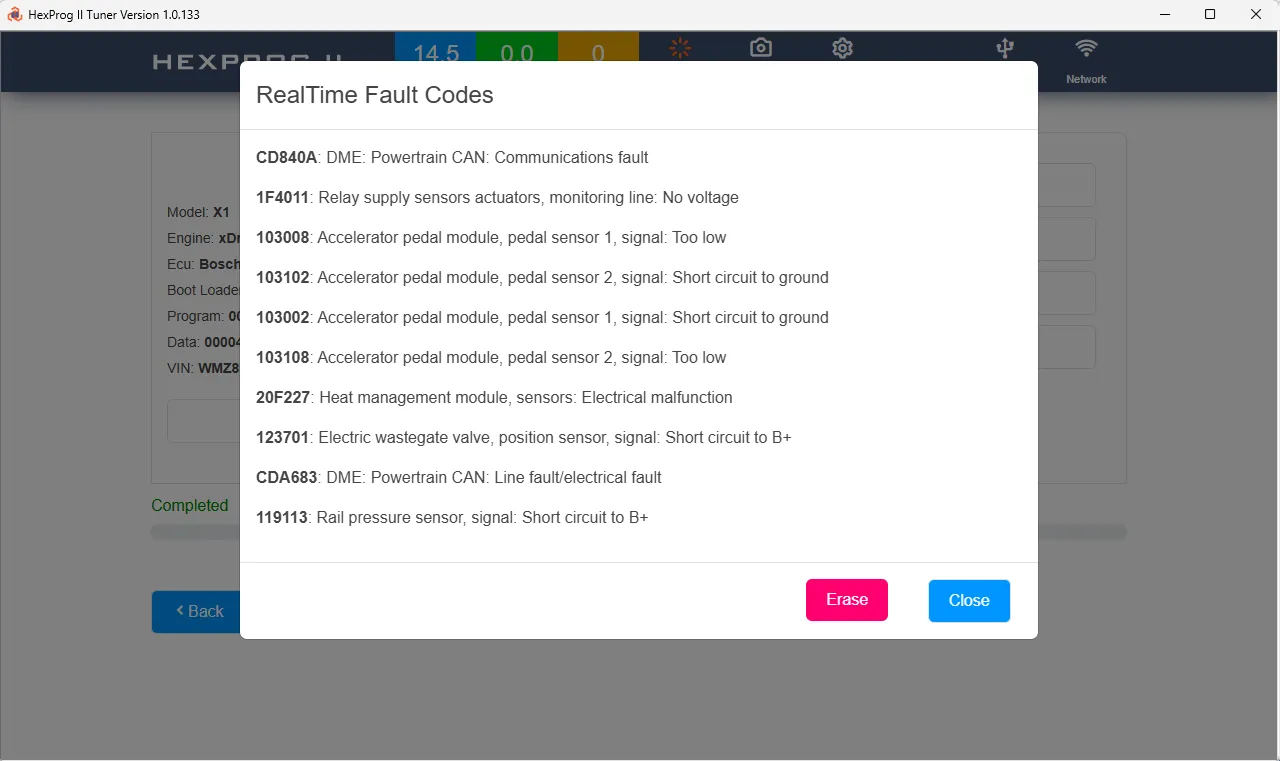
The RealTime Fault Codes window, illustrated in Fig. 4, provides:
- Reading of active DME diagnostic trouble codes (DTCs).
- Readable fault descriptions.
- Automatic refresh approximately every few seconds.
A single Erase action to clear the displayed fault-code set.
This feature is available through OBD rather than Bench Mode.
It provides a convenient way to review diagnostic faults during a tuning job, clear faults where appropriate, and check the resulting diagnostic status before returning the vehicle to the customer.
Note: Clearing fault codes does not resolve the underlying cause of a fault. Confirm that any relevant mechanical, electrical, or software issue has been addressed.
BMW ECU Coding Protection
On BMW ECUs, coding is not optional polish losing it will probably stop the engine from starting, and in the best case the car simply will not run right. A tool that flashes an MG1 and drops the coding is not a chip tuning tool. Hexprog II Tuner treats coding as protected data:
- Automatic dual location storage when a write starts. The coding is captured into the user database (VIN based, so it can be matched and detected later) and written as a file into the UserData\BMWCoding folder inside the Hexprog II Tuner directory. The VIN based archive is what rescues you in the worst case when a flash has failed and the ECU is sitting in programming mode, you cannot read the coding from the unit itself, and the VIN linked copy is how you get it back.
- Tuner controlled read and write. Hexprog II lets you Read Coding from the ECU and save a copy into your own folders, and Write Coding at any time.
- Automatic read before write / write back after. On the OBD path the tool reads the coding before writing and restores it after the operation completes, so the coding that came out is the coding that goes back in, with no manual step to forget. The automatic archive fires only when a write starts, and the whole coding flow is OBD only.
Pair this with the identification rule: if a job ever traps the ECU in programming mode, write the original flash to return to application mode first, then Bench to patch — and the coding archive is sitting there, VIN linked, ready to restore.
BMW MG1 ISN Reading
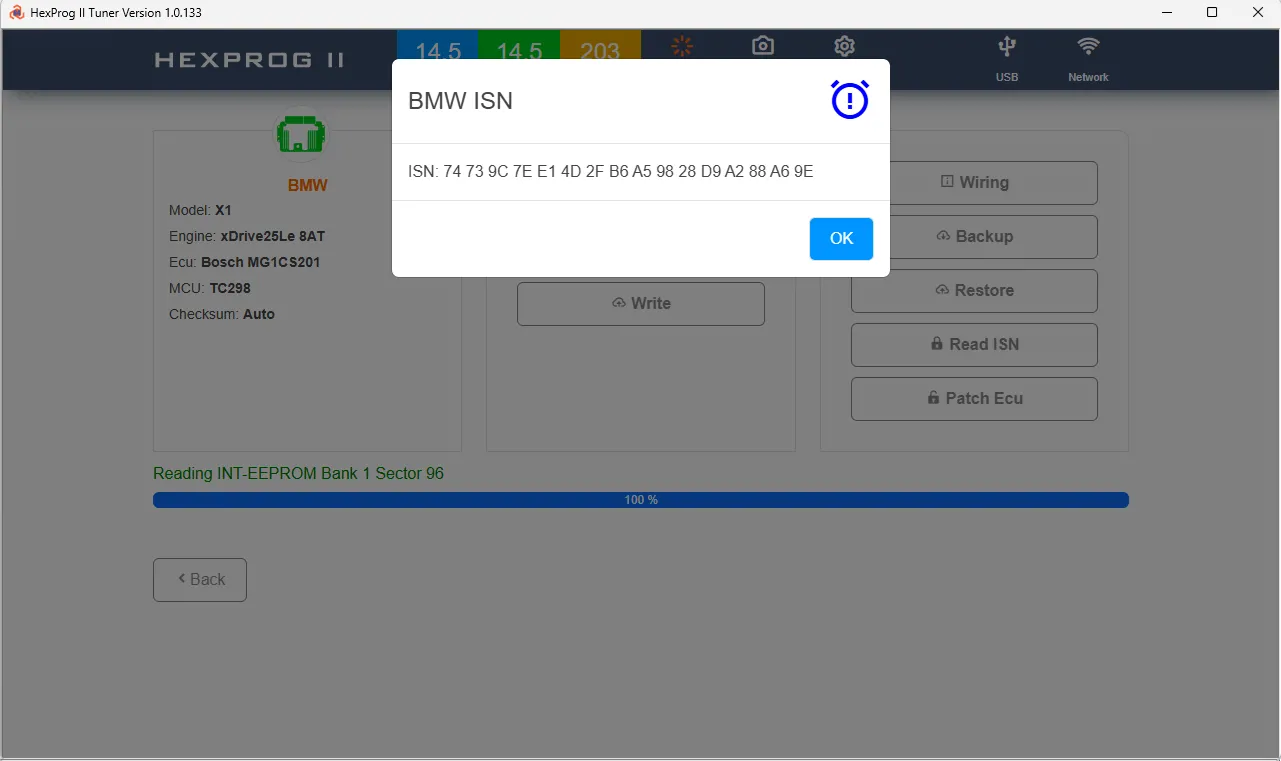
The Immobilizer Serial Number (ISN) is an important part of the BMW immobilizer system.
HexProg II Tuner supports ISN reading for supported BMW ECUs through Bench Mode, using the dedicated Read ISN function.
Reading the ISN alongside the ECU backup can help preserve important identification data for workshop reference and supported recovery work.
ISN writing is not available in HexProg II Tuner. This function is reserved for Autohex II, MicroTronik dedicated BMW tool.
This separation provides a clear distinction between the ECU tuning functions available in HexProg II Tuner and the dedicated BMW immobilizer functions offered by Autohex II.
Recommended BMW MG1 Tuning Workflow
Use the following checklist to select the appropriate workflow and protect essential ECU data.
- Step 1: Identify the ECU
Determine whether the ECU uses SPC5777 or TC29X hardware.
For TC29X units, establish whether the ECU belongs to the pre-lock or post-lock generation. If its status is uncertain, start with Bench Mode. - Step 2: Back Up the ECU
Create a backup before making changes.
When working in Bench Mode, read the available flash data and use the Read ISN function where supported and required. - Step 3: Select the Correct Programming Mode
SPC5777: Use the supported OBD workflow or Bench Mode.
Pre-June 2020 TC29X: OBD is supported; Bench is also available.
Post-June 2020 TC29X: Use Bench Mode directly or apply the required Bench patch before proceeding through OBD. - Step 4: Check the ECU Operating State
If the ECU is in Programming Mode, restore the original flash and confirm that the ECU has returned to Application Mode before attempting to patch it.
Never attempt to patch the ECU while it remains in Programming Mode. - Step 5: Program the Modified File
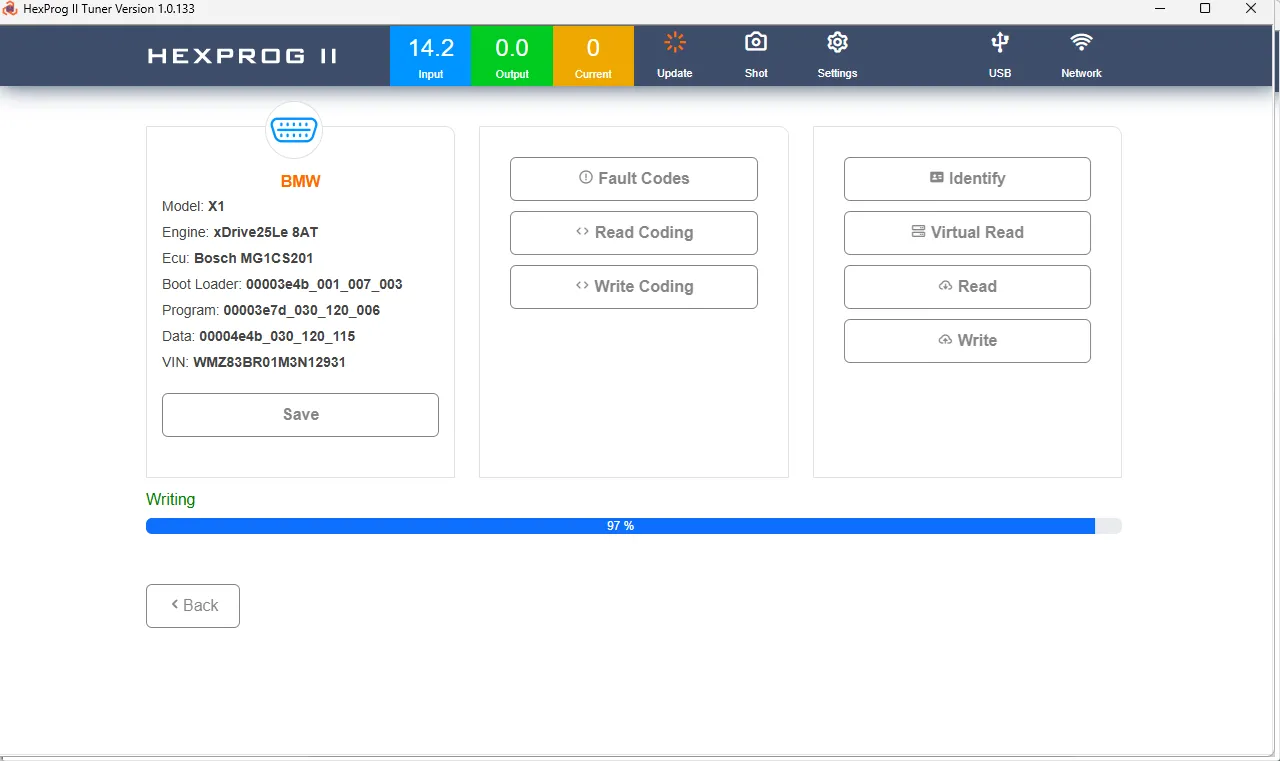
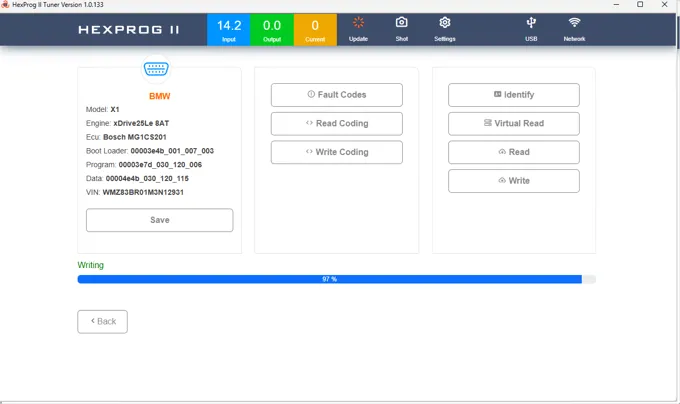 Writing Patched Ecu
Write the modified flash using the appropriate supported procedure.
For OBD operations, HexProg II Tuner automatically captures coding before writing and restores it after the operation completes.
Monitor the power-supply readings throughout programming and use the recommended HexProg II power supply. - Step 6: Check Diagnostic Faults
Use RealTime Fault Codes over OBD to review the DME's diagnostic status and clear fault codes when appropriate.
Investigate any faults that remain or return after clearing. - Step 7: Verify the Result
Confirm that the ECU communicates normally, coding has been retained or restored, and the vehicle's relevant functions operate correctly.
Keep the original backup and any required recovery data with the workshop job record.
If an internal reference code appears during a protection-related operation, contact support and include the exact code in the support ticket.
Why Choose HexProg II Tuner for BMW MG1?
The Bosch BMW MG1 family requires a tuning platform that understands the differences between ECU generations and security states.
HexProg II Tuner combines several functions in one workflow:
- Dual-mode support: OBD and Bench operations for supported BMW MG1 ECUs.
- Generation-aware procedures: Different workflows for SPC5777 and pre-/post-lock TC29X variants.
- Bench patching: Enables OBD access on supported post-lock TC29X ECUs.
- Recovery guidance: A defined procedure for recovering from Programming Mode and error 9D6.
- Integrated diagnostics: Real-time fault-code reading and a single-action erase function over OBD.
- Coding protection: Automatic coding backup and restoration during supported OBD write operations.
- ISN reading: Bench-based ISN reading for supported BMW ECUs.
Together, these capabilities provide a structured approach to BMW MG1 ECU identification, backup, patching, programming, and diagnostics.
Conclusion
The Bosch BMW MG1 is a major platform in modern BMW and MINI petrol-engine tuning, but its different microcontrollers and security generations require the correct programming method.
HexProg II Tuner supports both OBD and Bench workflows, with full Bench support across the supported MG1 range and OBD support for SPC5777 and pre-lock TC29X units. For supported post-lock TC29X ECUs, Bench patching enables subsequent OBD access.
Integrated fault-code management, VIN-linked coding backups, automatic coding restoration during supported OBD writes, and Bench ISN reading further support the workshop workflow.
Identify the ECU, back up the original data, select the correct mode, and follow the software instructions. These steps are essential for consistent, professional BMW MG1 tuning with HexProg II Tuner.