
Tuning the Continental SID212 by OBD with HexProg II Tuner
The Continental SID212 and SID212 EVO are engine control units (ECUs) developed by Continental / Vitesco Technologies to manage EcoBlue and TDCi diesel engines across modern Ford vehicles. These ECUs are widely used in models ranging from the Transit and Tourneo vans to the Focus, Kuga, Mondeo, and larger SUVs.
For professionals working in ECU remapping, chip tuning, and performance calibration, the SID212 family is an important platform to understand.
HexProg II has supported the SID212 / SID212 EVO in Bench Mode, providing tuners with a reliable off-vehicle workflow. Now, with the addition of OBD support, the same ECU can be read and written directly through the vehicle's diagnostic port, without opening the ECU housing or removing it from the vehicle.
Designed to handle the security requirements and memory protection of the SID212 family, HexProg II Tuner provides a streamlined workflow for ECU identification, reading, calibration, and writing.
OBD Support for the SID212 / SID212 EVO
The HexProg II OBD protocol is designed around three key priorities: reliability, speed, and safety.
Reliability
The protocol handles different ECU operating states, including cases where the ECU is already in Programming Mode. Instead of attempting an unsupported read, HexProg II detects the ECU's condition and guides the user through the appropriate recovery procedure.
This approach helps prevent incomplete or unreliable read files from being mistaken for valid originals.
Speed
The typical operation times are:
Read: Approximately 2 minutes.
Write: Approximately 3 minutes.
Actual times may vary depending on the ECU variant and operating conditions.
Safety
The OBD and Bench protocols focus on the ECU's MAP calibration area, keeping read and write operations within the intended tuning region.
By limiting write operations to the calibration area, HexProg II helps reduce unnecessary risks to other ECU memory regions during routine tuning work.
Following the software instructions and maintaining a stable power supply are essential for a reliable operation.
Step-by-Step OBD Workflow
The OBD procedure is straightforward and follows the same general sequence for supported SID212 and SID212 EVO variants.
1. Connect the Interface
Connect HexProg II to the vehicle's OBD diagnostic port and attach a suitable battery stabilizer.
Ensure that the power supply is stable and within the recommended voltage range before starting the operation.
2. Identify the ECU
Click Identify in the HexProg II software.
The tool reads the available ECU information and displays details such as the ECU model, engine information, part numbers, and VIN, as illustrated in Fig. 1.
This step also allows the software to determine the ECU variant and check its current access status.
3. Read the Original MAP File
Start the read operation and follow the on-screen instructions.
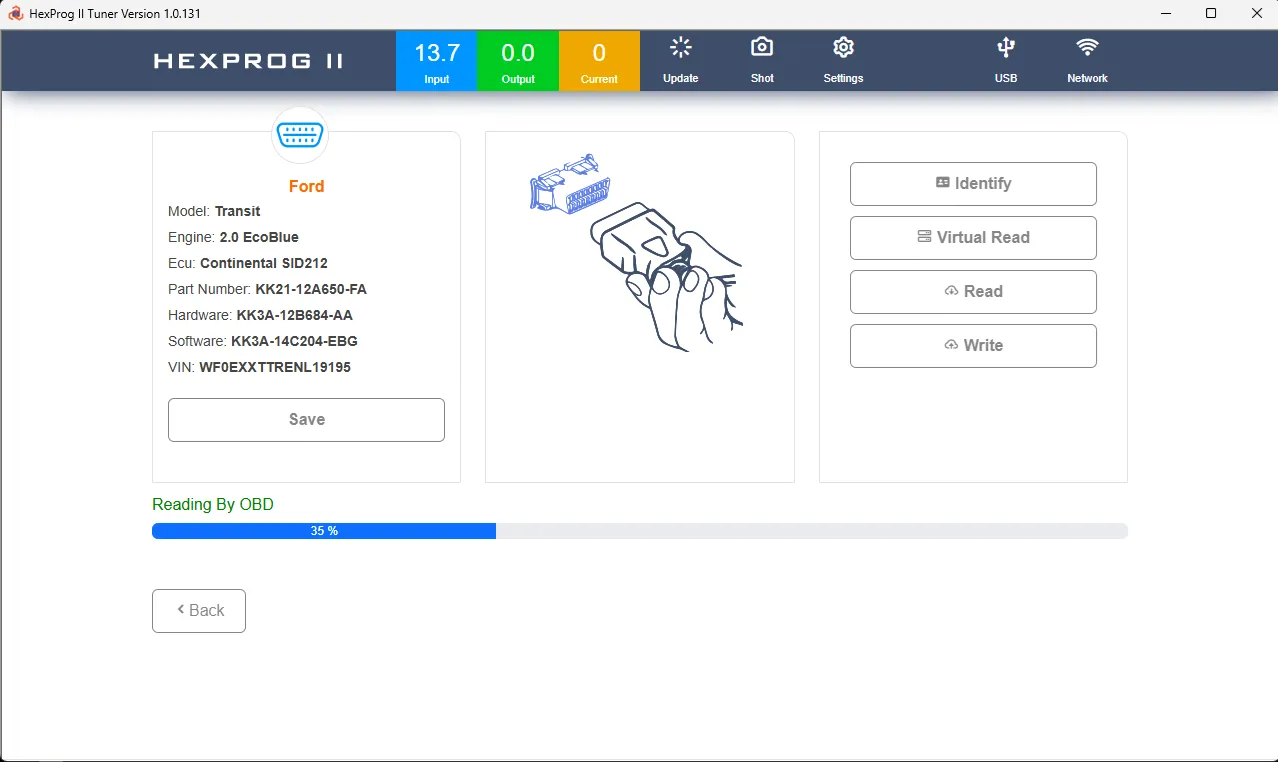
The software displays the progress under Reading By OBD. Once the operation is complete, save the original MAP file together with the ECU identification data.
A typical read takes approximately two minutes.
4. Modify the Calibration
Open the saved file in your preferred calibration software, make the required adjustments, and export the modified file in the supported format.
Always preserve the original file as a recovery reference.
5. Write the Modified File
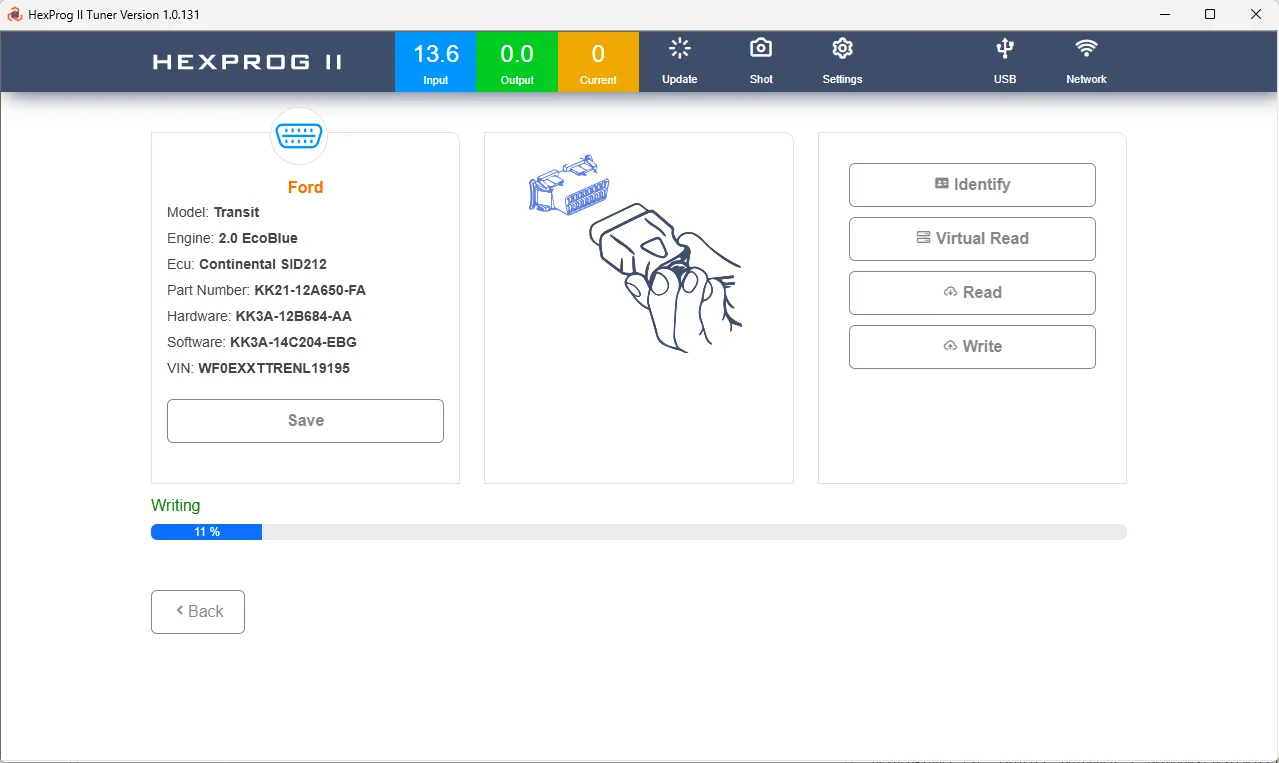
Load the tuned MAP file into HexProg II and click Write.
Monitor the progress indicator, as shown in Fig. 3, and maintain a stable power supply until the operation finishes.
Do not interrupt the process.
6. Verify the Operation
Allow the software to complete the procedure and any required checks.
Once the ECU has returned to Application Mode, identify it again to confirm that communication has been restored and the ECU is responding normally.
Automatic ECU Unlocking: A One-Time Process
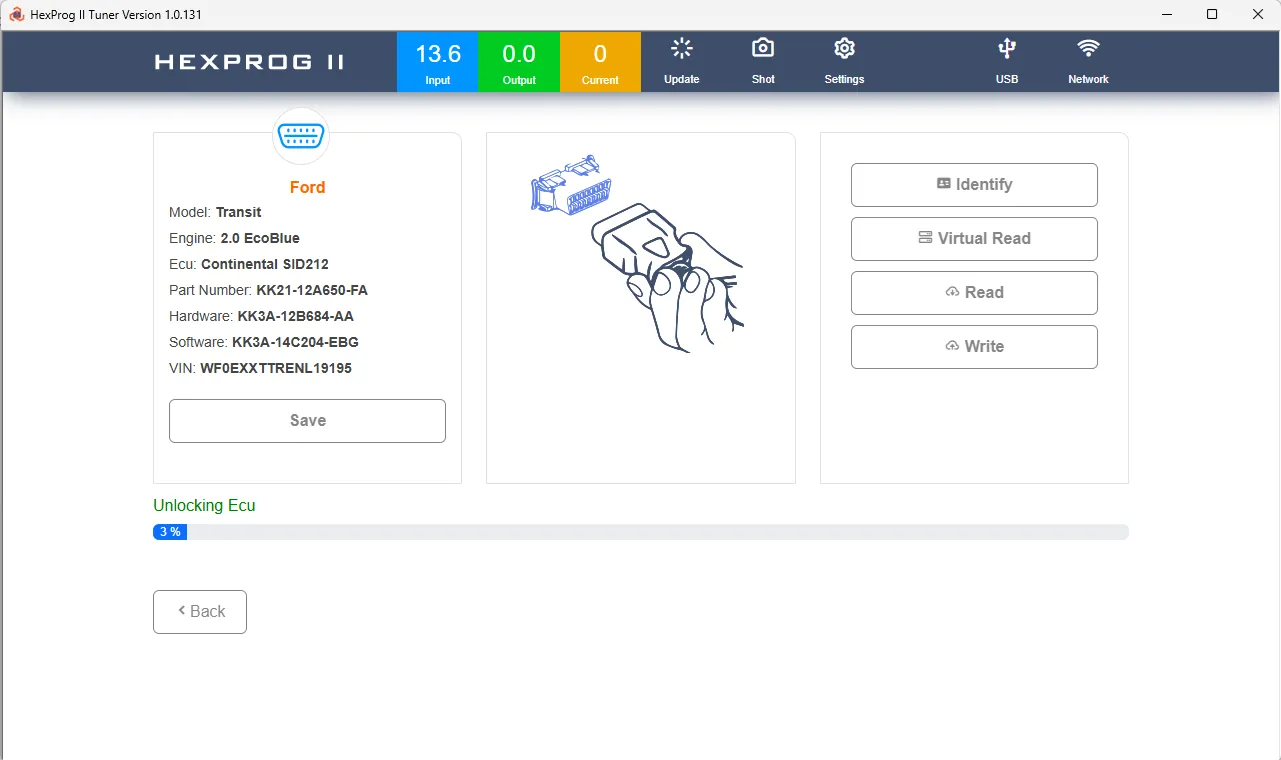
When a supported SID212 / SID212 EVO ECU has not previously been unlocked, HexProg II Tuner automatically detects this condition and initiates the required unlocking procedure.
Depending on the ECU variant, the process typically takes between one and three minutes.
The procedure offers three key advantages:
One-time operation: Unlocking is generally required only once for the supported ECU.
Fully automatic: The software manages the process without requiring a separate manual unlock command.
No flash modification during unlocking: The unlocking routine uses designated diagnostic and service procedures without writing or patching the flash memory.
Once the unlocking procedure is complete, supported read and write operations can be performed through the normal workflow.
Handling the ECU in Programming Mode
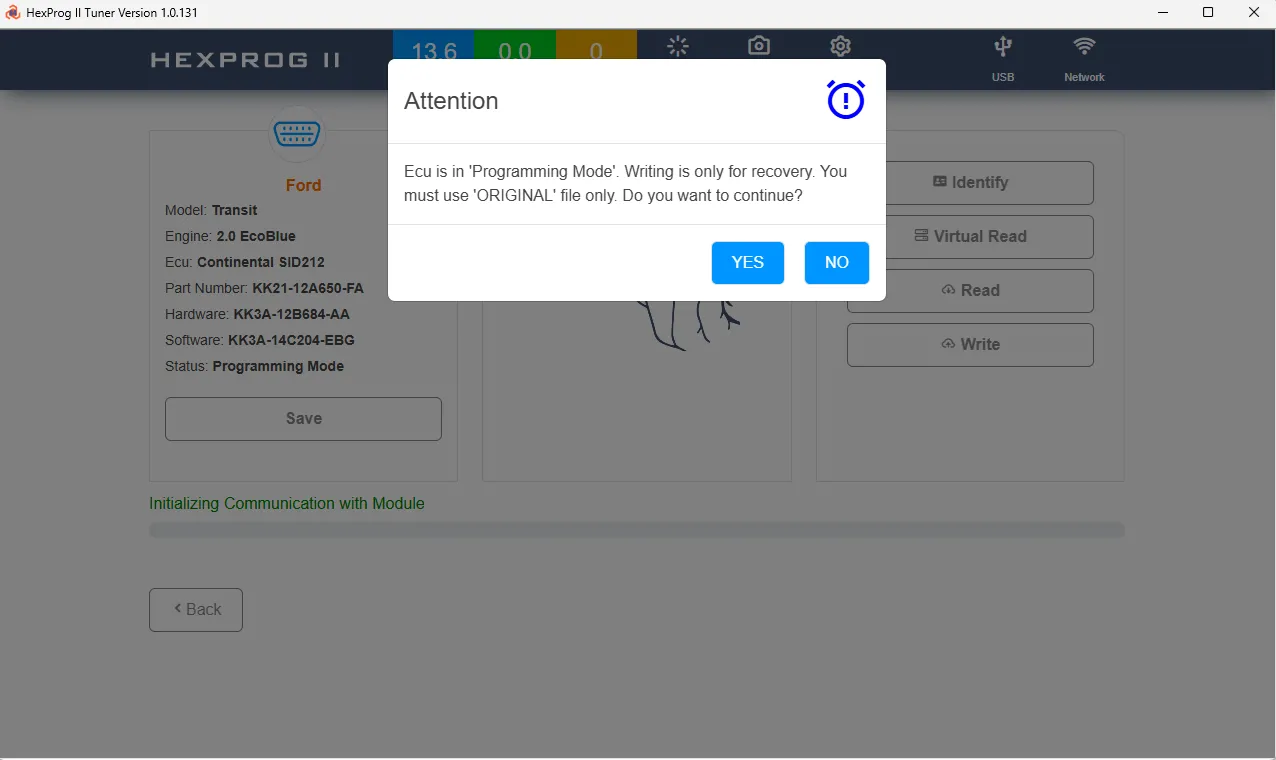
An ECU that is already in Programming Mode requires special attention. In this condition, a normal MAP read may not be possible, and attempting to write a modified calibration directly is not permitted by the HexProg II workflow.
When HexProg II detects this condition, it displays an alert dialog, as illustrated in Fig. 2, and guides the user through the required recovery procedure.
What Happens in Programming Mode?
Reading is restricted: The tool rejects the normal read operation rather than providing an incomplete or unreliable file.
Only the original file can be written: Modified or tuned files are not accepted while the ECU remains in this state.
Application Mode must be restored first: Writing the original MAP file allows the ECU to return to its normal operating mode, provided the recovery procedure completes successfully.
Recommended Recovery Sequence
Follow this sequence when the ECU is detected in Programming Mode:
Load and write the original MAP file.
Allow the operation to finish and the ECU to return to Application Mode.
Identify the ECU again to confirm its operating state.
Write the modified MAP file using the normal OBD procedure.
The writing progress shown in Fig. 3 may correspond to restoring the original file. The tuned calibration is written afterward as a separate operation.
Important: Do not attempt to bypass the Programming Mode restrictions by forcing a modified file into the ECU.
What If the Original File Is Missing?
The Read Virtual File function may provide an alternative when the original file is unavailable.
For supported cases, the virtual file supplies the original MAP calibration area needed to restore the ECU to its original calibration state and complete the recovery process.
Bench Mode: An Alternative to OBD
OBD support expands the available workflow without replacing the existing Bench Mode functionality.
When the ECU is removed from the vehicle or an off-vehicle procedure is preferred, HexProg II continues to support the SID212 family in Bench Mode.
Bench Mode provides:
Reading and writing of the MAP calibration area.
Additional D-FLASH reading for diagnostic purposes.
A controlled workflow that keeps D-FLASH read-only.
This distinction helps maintain a clear separation between calibration operations and other ECU memory regions.
Choose the method that best suits the job: OBD Mode for convenient in-vehicle access, or Bench Mode when the ECU needs to be handled off the vehicle.
Maintaining a Stable Power Supply
A stable power supply is essential when working with the SID212 / SID212 EVO.
Keep a suitable battery stabilizer connected throughout the reading and writing procedures, maintaining the system voltage within the recommended range of 13–14 V, subject to the equipment and vehicle requirements.
For reliable operation:
Do not rely solely on the vehicle's battery.
Avoid unstable voltage or sudden power fluctuations.
Do not disconnect the stabilizer during an operation.
Never interrupt a read or write while the progress indicator is active.
Maintaining stable voltage is one of the most important steps in reducing the risk of an interrupted programming operation.
Best Practices and Troubleshooting
Follow these recommendations for a smoother and more reliable tuning workflow.
Save the original file. Always retain the original MAP file and its ECU identification data before making any modifications.
Follow the software prompts. Keep the ignition, vehicle accessories, and ECU communication in the state requested by HexProg II.
Avoid interruptions. Do not start the engine, disconnect diagnostic equipment, or change the power supply during an active operation.
Prepare the laptop. Connect it to a reliable power source and disable sleep mode to prevent the software session from being interrupted.
Check the ECU operating mode. If a read operation is rejected, check whether the ECU is in Programming Mode and follow the recovery instructions displayed by the software.
Use Virtual File when appropriate. If the original file is unavailable, check whether Read Virtual File supports the ECU and can provide the required original MAP calibration.
Choose the appropriate mode. Use OBD for in-vehicle work and Bench Mode when off-vehicle access or additional D-FLASH reading is required.
Conclusion
The addition of OBD support for the Continental SID212 and SID212 EVO makes HexProg II Tuner more versatile for professional ECU tuning workshops.
With fast MAP reading and writing, automatic unlocking, guided Programming Mode recovery, and Virtual File support for applicable cases, the tool provides a structured workflow for working with this ECU family.
Bench Mode remains available for off-vehicle operations, including read-only D-FLASH access.
By combining OBD convenience with the existing Bench Mode capabilities, HexProg II Tuner gives professionals a practical solution for supported SID212 / SID212 EVO applications, while keeping calibration operations focused on the intended memory area and guiding users through the appropriate procedures.